Eligible Surplus Buyers
Agencies and Organizations
Newly acquired property will not be available for redistribution to agencies. TTUHSC surplus must hold all surplus items of value up to thirty days to allow TTUHSC departments the opportunity to view and acquire the items. Agencies will be given the opportunity to view and acquire property prior to items being placed on public sale. Please be considerate of the needs of other agencies. Do not tag or ask us to hold items for an extended period of time.
TTUHSC Departments
TTUHSC departments may view items on Public Surplus before they are offered for sale. If you need to view items for redistribution, please register with your TTUHSC email address and follow these instructions. If you would like to bid on items for personal use, please use a personal email address and follow the instructions on the tab for on-line public bidding.
Additional information for departments is available on our internal web site for Surplus.
Public Sale
Anyone can view all items available for sale at the link to Public Surplus® prior to registering and/or placing a bid. The site includes search options, photos and a description of each item. You may browse items without creating a login.
How to Register
-
Lubbock
To register as a Texas State Agency, Independent School District, local or county government, public assistance organization or to see if your entity meets the requirements defined by Texas Government Code 2175.001, contact us at GeneralServices@ttuhsc.edu or (806) 743-2099.
Register Your Agency or Organization in Lubbock
Abilene
To register as a Texas State Agency, Independent School District, local or country government, public assistance organization or to see if your entity meets the requirements defined by Texas Government Code 2175.001, contact us at abilenesurplus@ttuhsc.edu or (325) 696-0406.
Register Your Agency or Organization in Abilene
Amarillo
To register as a Texas State Agency, Independent School District, local or county government, public assistance organization or to see if your entity meets the requirements defined by Texas Government Code 2175.001, contact us at Mark.Hulsey@ttuhsc.edu or (806) 414-9919.
Register Your Agency or Organization in Amarillo
Permian Basin
To register as a Texas State Agency, Independent School District, local or county government, public assistance organization or to see if your entity meets the requirements defined by Texas Government Code 2175.001, contact us at generalservicespermianbasin@ttuhsc.edu or (432) 703-5229.
-
Important Information for On-Line Public Bidding
If you want to become a buyer, click “register”. Complete the form and go to the Buyer Agreement. Please read the Agreement thoroughly. The agreement is between the Registrant and Public Surplus, not TTUHSC. All payments will be made through Public Surplus. All items are subject to 8.25% sales tax unless the Buyer provides a tax exempt certification to the seller. Public Surplus will add a 10% premium to all sales.
Lubbock
Link to Public Surplus is filtered to TTUHSC Lubbock.
Abilene
Link to Public Surplus is filtered to TTUHSC Abilene.
Amarillo
Link to Public Surplus is filtered to TTUHSC Amarillo.
Permian Basin
Link to Public Surplus is filtered to TTUHSC Permian Basin.
-
If you would like to bid on items for personal use, please use a personal email address and follow the instructions on the tab for on-line public bidding.
Additional information for departments is available on our internal web site for Surplus.
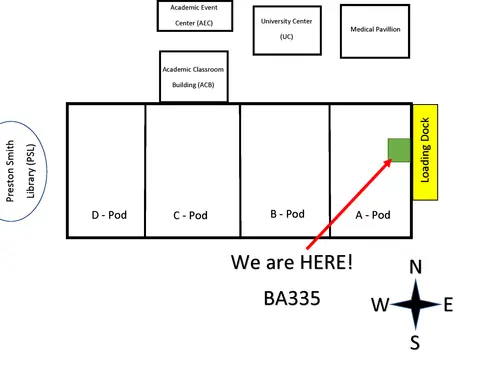
Viewing Hours and Location (Lubbock Only)
To view the surplus we are located at TTUHSC Building, 3601 4th Street Stop 9085, Room BA335.
TTUHSC Emplyees Only Viewing Hours
Mondays, 2–4 p.m.
Public Only Viewing Hours
Wednesdays from 2–4 p.m. and Fridays from 9:30–11 a.m.
Abilene, Amarillo, and Permian Basin locations have viewing available online only.
Additional Resources
-
What rules govern interagency transfers?
HSC OP 63.11, Texas Government Code §2175 & §403.278, and Texas Higher Education Coordinating Board rules.Which Agencies can acquire items from TTUHSC Surplus?
All Texas schools including TTU, SPC, public schools, open enrollment charter schools, city and county departments, public assistance organizations, non-profit food banks, homeless assistance groups, groups with Health and Human Services contracts, and agencies included in Texas Government Code §2175.When are items available to view in person?
Viewing is available on-line. Certain hours are occasionally set aside for special school viewing. Email generalservices@ttuhsc.edu to be added to the contact list for the Lubbock surplus.Are items available for on-line viewing?
Yes, most surplus items are available for on-line redistribution. Simply go to www.publicsurplus.com and register. After creating a login ID, please contact Butch Castner to arrange view access to items available for redistribution before they are made available for public sale.What type of item is not available for on-line viewing?
Bulletin boards, pictures, and small office supplies are not photographed and posted on-line.I see items for sale from several different agencies. How can I view only items from TTUHSC?
You may restrict your view as follows: On the far right side of the site under the category “Browse Auctions Within Area”, chose Texas as the region and Texas Tech University Health Sciences Center as the Agency. You may browse items without creating a login.Can items be “held” for an Agency?
No. Once a school or agency “tags” or otherwise requests property, it needs to be picked up within 5 days. Certain large items may require special consideration.What rules apply if the agency no longer needs an item obtained through TTUHSC surplus?
Once an item has been acquired from TTUHSC, it is considered to be the property of the school or agency picking it up. This property is to be inventoried, controlled, and disposed of the same as items paid for by the school or agency. The TFC form requires Assistance Organizations to use items for a minimum of two years prior to disposal/transfer.Can I be on an “alert” list to let me know when a specific type of item becomes available?
Yes. Set up your profile online at www.publicsurplus.com and list the items you need. An email alert will be sent to you automatically as items available.My agency needs that item more than they do. Is there a way to get preferential treatment?
If two schools both arrive on the same day and want the same item TTUHSC General Services will assist in determining priority. Preference is given to the smaller schools, demonstrated need, and quantity available. A rural clinic would have priority on medical equipment, and specialty equipment that could be used in an existing program would outweigh the desire for holding in reserve in case it can be used.Do you have computers available?
No. All of our computer items are sent to Texas Correctional Industries where they are refurbished. Most schools and agencies can visit their website and obtain the refurbished equipment by completing the System Configuration Request Form.May I acquire an item through an Agency Transfer and then use the item personally or sell it?
No. -
How does on-line bidding work?
You must be registered before you can place bids utilizing the on-line auction process. Once registered, you will be able to logon, review available property and place bids. You will be able to review and update your user profile, account status, see items you have placed bids on and see items you have been awarded.Can I be on an “alert” list to let me know when a specific type of item becomes available?
Yes. Set up your profile online at www.publicsurplus.com and list the items you need. An email alert will be sent to you automatically as items are available.What types of items do you have in the auctions?
Auction items vary from day to day. You can monitor the items for sale on the website.Do you sell Computers?
No. The transfer or disposition of data processing equipment, such as computers, is controlled by Texas Government Code § 403.278 or Texas Government Code Chapter 2175Do I get any warranty on an item?
No. There are no warranties associated with any items sold through TTUHSC Surplus. All items are sold "AS IS - WHERE IS."How do I submit a bid on an item?
For on-line auctions, all bids are done on the website www.publicsurplus.com.How will I be notified if I am the highest bidder for items I bid on using the electronic bidding method?
Once the online auction is closed you will be able to see online who had the highest bid. A system generated “Notice of Award” will be sent to the e-mail address you entered when you registered.How will I know how much time I have to pay and remove items I have been awarded?
All Items are “As is-Where is” and need to be paid for and removed within 5 days of bid closing.What happens if I am the high bidder on an item and I do not pay for the item or I pay for the item and do not remove it before the deadline stated on the “Notification Award of Property”?
If the person/company awarded property fails to pay for the property prior to the time indicated on the “NOTIFICATION - Award of Property”, the property purchased will be promptly re-listed and the bidder will be blocked. Call the contact number listed on the item(s) if special arrangements are needed. We may not be able to grant all requests due to space constraints and other considerations. No refunds will be issued.Can I allow someone else to Pick-up items I have been awarded?
Yes. If someone other than the winning bidder will be picking up the property, please send an email or call contact number listed on the item(s)with the name of the person who will be picking up the property on your behalf.What are the terms and conditions of sale?
The Terms and Conditions are posted on each item. Please pay careful attention. -
- No contingency to your bid exist other than those stated in the listing at the time of sale.
- You may not retract, amend or modify a bid without prior approval by the Seller.
- You will be financially responsible for any bids placed using your username and password.
- You are capable of removing the property from its location within the required time frame.
- You have or can readily obtain the Trade Security Control (TSC) clearance to buy any property that requires a clearance.
- You are a real person or entity, with a verifiable address, telephone number and email address as provided to us.
- You are dealing in good faith and are not attempting to defraud, cheat, or wrong Public Surplus or any Seller.
- You have inspected every item prior to placing a bid or you waive the need for inspection.
- Except as otherwise stated in writing by the Seller on the Site, you understand that all assets are sold "as is, where is."1.4. Fees. Public Surplus charges no fees for you to register to make bids or purchases on the Site. However, if you bid on an item, are the successful bidder, and do not purchase the item, you may, at their option, be assessed a service fee equal to $200 or 40% of your successful bid price, whichever is greater. Other fees apply for other Services as shown on the Site. Fees may change from time to time. You are responsible for paying all fees and applicable taxes associated with the Site in a timely manner with a valid payment method. If your payment method fails or your account is past due, they may collect fees owed using other collection mechanisms.1.8. Electronic Signature. Prospective bidders are notified by this statement that your consent to these terms and conditions by checking the box indicating your agreement to be bound to these terms, meets the requirements of Section 101(c) (1) (C) (ii), the Consumer Consent Provision, of the Electronic Signatures in Global and National Commerce Act (ESIGN). You may print these terms and conditions, but they are subject to change by us. Changes to the terms and conditions will be effective from the time they are placed on our web site, in the terms and conditions section of the site, or any other section where they may appear.
- You may register as a buyer, search for specific items, or browse items from other agencies.
- You may browse items without registering.
-
The Mover Service for the Lubbock campus has transferred to Facilities Plant Operations in order to be consistent with the other campuses. Request a move on the internal HSCweb.